
Product Description
English version SKX-1000D+ Blood Oxygen Simulator SPO2 Blood Oxygen Signal Simulator English version SKX-1000D+ Blood Oxygen Simulator SPO2 Blood Oxygen Signal Simulator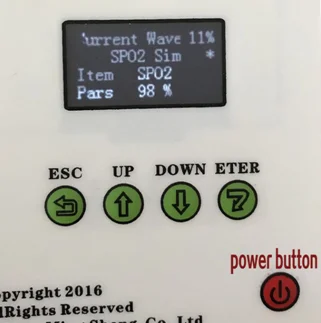
Simulator has
five buttons
From left to right
are the return key, increase (right shift) key, decrease (left shift) key,
confirm key, and the power key in the lower right corner.
Key definition:
return key:
From the lower
menu to the upper menu, the first menu is the highest menu, and the third menu
is the lowest menu;
Increase the
key:
In the first and
second floor menus, select the menu item backwards, the ECG waveform is the
first item, and the menu is set to the last item;
Decrease the
key:
In each menu,
select the forward menu item, the ECG waveform is the first item, and the menu
is set to the last item;
Enter:
Select the
confirmation key, from the higher level menu to the next level menu, in the
third level menu, the confirmation key will confirm the parameter change and
produce the corresponding waveform.
power button:
Power on: Long press the key for two seconds. When“Operation
Help”is displayed, press the Select key again to enter the
main interface of the instrument.
Shutdown: In the state shown on the screen, press and hold the key for two
seconds to turn off the instrument.
ECG part of the connection:
1.
Electrocardiograph connection: RA-R (right hand), LA-L (left hand), LL-F (left
leg), RL-RF (N) (right leg), C1-C6 chest conduction;
2. Monitor
connection: RA-right hand (white), LA-left hand (black), LL-left foot (red),
RL-right foot (green), C1-C6 chest guide (brown);
3, three-guide
connection method: RA-right hand (white), LA-left hand (black), LL-left foot
(red);
4, the European
standard corresponding connection: L-LA R-RA RF (N)-RL F-LL C-V;
The default II
lead amplitude is 1mV when the simulator is turned on. In the heart rate
detection waveform, square wave, sine wave, and QRS wave, the amplitude of the
II lead is 1mV.
Blood oxygen probe
and analog finger connection:
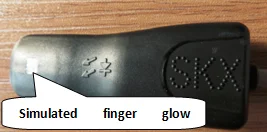
Place this side of the analog finger (as shown above) on the receiving end of the oxygen probe
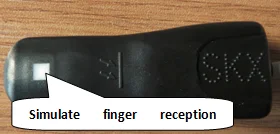
Place this side of the analog finger
(above) into the red light end of the oxygen probe
1.in the blood oxygen simulation finger on
the part of the logo, please face the blood oxygen probe luminous
tube part; in the blood oxygen simulator finger on the part of the
identification, please face the blood oxygen probe receiving
tube part, please be sure Note that the position of the white window on the
finger needs to be aligned with the position of the receiving tube, otherwise
it may not be able to obtain a valid value.
2. When the blood oxygen probe is in the
vacant state, the red light of the blood oxygen probe is blinking. When the
analog finger is put into the blood oxygen probe, if it enters the normal
working state, the red light of the blood oxygen probe is always on.
3. in the process of detecting blood oxygen
saturation, if there is a certain deviation in the blood oxygen value, you can
check whether the value is corrected by placing a simulated finger repeatedly.
��?��MW
About Prime Living
Prime Living is a Canadian online store offering a carefully selected range of quality products for home, automotive, tools, outdoor living, electronics and more.
We are committed to fast order processing, secure packaging and reliable tracked shipping to provide an excellent shopping experience.
Shipping policy
We carefully handle each order to ensure your package arrives quickly and safely. Please note that factors such as weather, postal traffic, or carrier performance may occasionally cause delays beyond our control.
We provide free shipping and dispatch all orders within 2 business days of payment, often sooner. All shipments are sent via international express air shipping, with a tracking number provided so you can follow your order every step of the way.
. Please provide a physical address, as we do not ship to P.O. Boxes.
Returns
Your satisfaction is important to us. Hexlight offers a 14-day Free return policy: if you are not fully satisfied with your purchase, you may request either a full refund or an exchange. All return shipping costs are fully covered by us.
Condition
Brand New
Shipping
This item is shipped directly from our supplier in China with tracking.