Product Description
HS64 Graphics Drawing Tablet with Battery-Free Stylus for Android Windows Mac Linux HS64 Graphics Drawing Tablet with Battery-Free Stylus for Android Windows Mac Linux
- OS Android 6.0 Supported: You can easily connect your phone to the tablet with the OTG connector. It is also compatible with Windows 7 or later,macOS 10.12 or later, ChromeOS 88 or later and Linux. IPhone and iPad are not avaliable, please be informed.
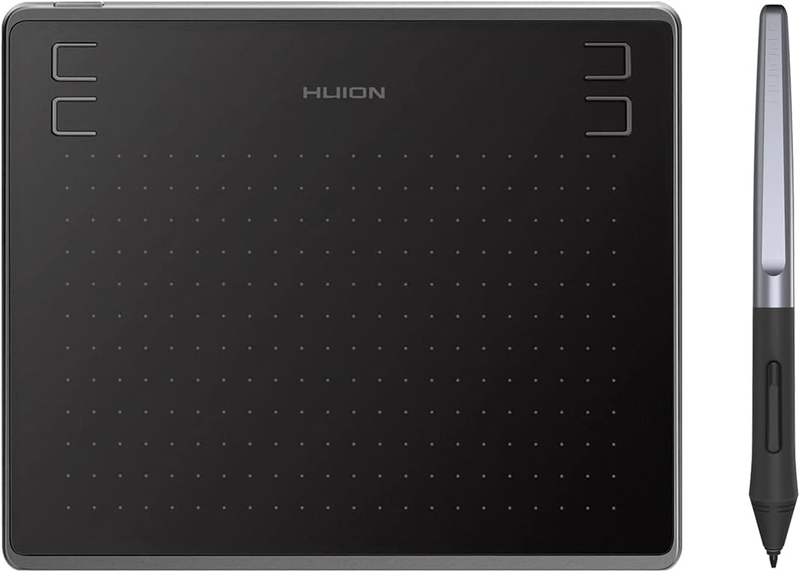
- Battery-free Pen - Set you free from charging trouble, the game and drawing will never be interrupted by the battery problem.
- 4 Customizable Press Keys - Keep all your favourite short-cut in handy; which are available on the tablet to have different functions realized via your fingertip;The equipped Micro USB interface helps you transmit the data more quickly and effectively.
- Compatibility - Windows 7 or above /Mac OS 10.12 or above /Android 6.0 or above; Work with mainstream digital art software: Adobe Photoshop, Illustrator, Corel Painter, Manga Studio, Clip Studio, Zbrush, Krita, Gimp and more
Product Description
1. What does OTG refer to?
OTG is the abbreviation of On-The-Go. It is a technology mainly used for the connection between various devices or mobile devices for data exchange.
2. How to know if my mobile phone or tablet is compatible with HS610 or HS64?
Your phone or tablet must be equipped with Android 6.0 or above and should have an OTG function. If you are not sure, please consult us for further information.
3.Can I connect HS610 or HS64 to iPhone or iPad?
Sorry, but NO. Currently, these two models only support Windows 7 or above, Mac OS 10.12 or above, and Android 6.0 or above.
4. Why is part of my Huion tablet not responding when connected to my Android phone or tablet?
Once connected to a phone or tablet, the Huion tablet will automatically detect and change into phone mode, in which the pen can only work in the area to the left.
Buttons on both the Huion tablet and the pen will not work in phone mode either.
Also, you cannot rotate your Android phone or tablet when using Phone mode.
5. Do I need to install a driver when connecting the tablet to an Android phone or tablet?
Nope. The pen tablet can work without installing any driver into your phone or tablet.
But you’ll need to install a driver first when connecting to a PC.
6. What should I do when the tablet fails to enter the phone mode?
When the HS64 pen tablet failed to enter the phone mode automatically, please press button 1 for 3 seconds to enter the phone mode.
7. What App can be used in phone mode?
Theoretically, as long as it is a drawing software that can be used under Android OS, then you can use that drawing software in phone mode.
8. Will there be pen pressure in the app under the phone mode?
It depends on the software itself. If the drawing software has pen pressure then the pen has pen pressure under the phone mode.
Connecting to Android Devices
Make sure your phone OS is the following: Android OS 6.0 or later, the pen can only work in the left gray area( 102*63.75mm).
Go to Phone "Settings" then enable the "OTG" function.
It will be convenient for you to take it out of the office and use it anytime, anywhere by connecting to your phone.
HUION HS64
Battery-free Pen
HUION HS64 drawing tablet comes with a battery-free pen, which makes you in painting.
Mobile Phone Workspace
The working area for the phone is fixed, please be informed. It's on the left of the product. HS64 only works with Android OS 6.0 or later.
4 Press Keys
You could set any function you want on the four shortcuts to increase productivity.
HUION HS64
Anti-slip
It can be stabilized on the table when you are drawing, and will not swing freely due to the slippery of the tablet.
Ultrathin & Portable
Easy to carry, thinner than a mobile phone. It is just 258g.
Compatibility
It works with Windows 7 or later, macOS 10.12 or later, and Android 6.0 or later. It is also compatible with mainstream software like MediBang, Bamboo Paper, SketchBook, Adobe Photoshop, Clip Studio, Paint Tool Sai, and more.
About Prime Living
Prime Living is a Canadian online store offering a carefully selected range of quality products for home, automotive, tools, outdoor living, electronics and more.
We are committed to fast order processing, secure packaging and reliable tracked shipping to provide an excellent shopping experience.
Shipping policy
We carefully handle each order to ensure your package arrives quickly and safely. Please note that factors such as weather, postal traffic, or carrier performance may occasionally cause delays beyond our control.
We provide free shipping across Canada and dispatch all orders within 2 business days of payment, often sooner. Shipping is express, with estimated delivery times of 2 to 4 days. Please provide a physical address, as we do not ship to P.O. Boxes.
Returns
Your satisfaction is important to us. Hexlight offers a 30-day Free return policy: if you are not fully satisfied with your purchase, you may request either a full refund or an exchange. All return shipping costs are fully covered by us.
Condition
Brand New
Shipping
This item is shipped directly from our supplier in China with tracking.