Product Description
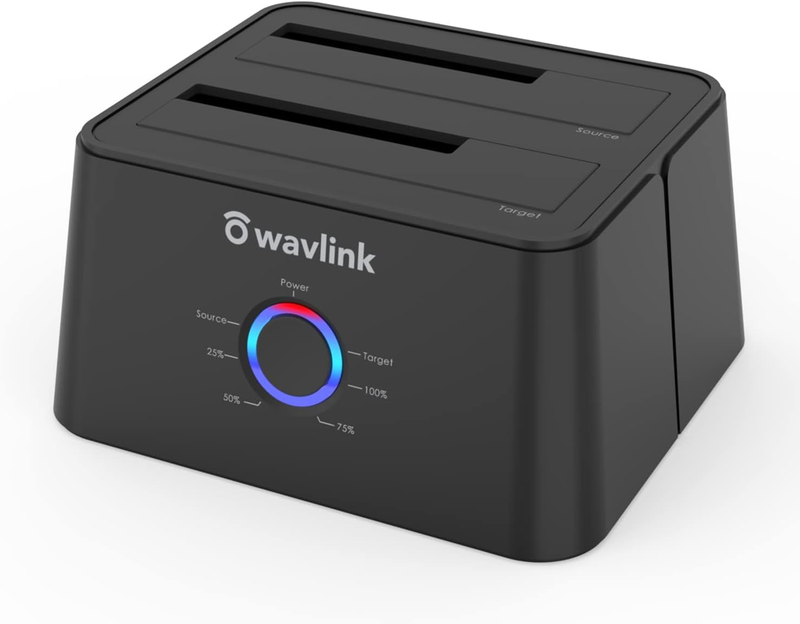
USB 3.0 to SATA I/II/III Dual-Bay External Hard Drive Docking Station for 2.5/3.5 Inch HDD/SSD with UASP (6Gbps), Support Offline Clone Duplicator and Auto Sleep Function [16TB X2 ]-Black![USB 3.0 to SATA I/II/III Dual-Bay External Hard Drive Docking Station for 2.5/3.5 Inch HDD/SSD with UASP (6Gbps), Support Offline Clone Duplicator and Auto Sleep Function [16TB X2 ]-Black](https://autods-scraper-images.s3-us-west-2.amazonaws.com/1378bf5a40a30a8ad037e9512249f4d8.png) USB 3.0 to SATA I/II/III Dual-Bay External Hard Drive Docking Station for 2.5/3.5 Inch HDD/SSD with UASP (6Gbps), Support Offline Clone Duplicator and Auto Sleep Function [16TB X2 ]-Black
USB 3.0 to SATA I/II/III Dual-Bay External Hard Drive Docking Station for 2.5/3.5 Inch HDD/SSD with UASP (6Gbps), Support Offline Clone Duplicator and Auto Sleep Function [16TB X2 ]-Black- Support USB 3.0 external, SATA-I/II/III internal; Works great with 2.5 inch and 3.5 inch SATA HDD/SSD
- Support transfer speeds up to 6Gbps by UASP transfer protocol, which is up to 20% faster than USB 3.0. Speeds up to 5Gbps (USB 3.0),480Mbps (USB 2.0), 12Mbps (USB 1.1)
- Support Offline Cloning up to 60Mbps. No drivers needed, easy installation; Offline clone is from source disk to target disk. Please note the target disk must be larger than the source disk; not support online Clone
- Built-in Power Control Switch; Highly efficient (12V, 3A), stable and reliable DC power source a steady supply of energy; Automatic sleep mode after 30 minutes of inactivity saves energy
- Tool-free installation on Windows 10 through XP, Mac OS X, and Linux / Unix, Support hot-swapping and easy set up.(No drivers are required for the disk dock itself as it uses the standard USB Mass Storage class)
- UASP Accelerated-Super speed USB 3.0 data file transfers (up to 5 Gbps/420MB/s) from your computer to back-up files and centralize storage for convenient access.
Product Description
- 1 x Dual Bay SATA HDD Docking Station - 1 x 12V 3A Power Adapter - 1 x USB 3.0 Cable -1 x User's Manua -1 x Card
Offline Clone-Make sure that the USB cable is disconnected from your computer.
1, Insert one hard drive in the Source bay, other drive in the target bay
2, Connect power supply and switch on power.
3. Press and hold the offline clone button for 3 seconds, the LED indicator will light up
4. Press the clone button again, the offline clone operation will start !
5. The cloning process is complete when ALL the lights turn solid Blue (25%-100%).
Video of offline clone: www.youtube.c.o.m/watch?v=DhvIdwzu9Hw
Tips for Offline Clone- The capacity of target disk must be larger than the source disk.
- Please confirm that your source drive and target drive can both work properly.
- Please connect the 12V power adapter to ensure a stable power supply for transmission.
- To avoid data transfer errors, overheating and damage to the device, please make sure that there are no faulty driver cells.
- To avoid data loss, do not remove or insert drives when one drive is working in the docking station. Please power off the dock before removing.
- Please confirm the target drive have no data. If you have existing data on the target drive, the cloning process will eliminate your target drive's data. Because the target drive will be cloned to be the same as the source drive, partition, format and data are the same too.
Dual Bays USB 3.0 Docking Station with Offline Clone Function
- Support 2x 16 TB hard drive. Equipped with 12V/ 3A power adapter
- USB 3.0 interfaces, 5 Gbps Transfer Speeds. Backwards compatible with USB 2.0, 1.1 and 1.0
- SATA III internal interface , Support SATA I/ II/ III HDD and SSD
- No Driver Needed. Compatible with Windows XP/ Vista/ 7/ 8 / 8.1 / 10, Mac OS/ Linux.
- LED: Power*1 HDD*2 Clone*4 (25% 50% 75% 100%)
- Please backup files in the target hard drive before cloning. Any files in target hard drive will be overwritten when offline cloning occurs.
- To avoid data loss, do not remove or insert drives when one drive is working in the docking station. Please power off the docking station before removing.
- Do not try to insert or withdraw HDD or SSD when another hard drive running.
- Overheating and damage to the device please make sure that there are no faulty driver cells.
Instructions on How to Connect the Dock to the Computer:
- 1). Please unplug the DC power adapter to make sure that the power is off before starting.
- 2). Insert HDDs/SSDs into the slots vertically and slowly until them stick.(One HDD/SSD is also supported)
- 3). Connect the power adapter and turn the "ON-OFF" switch on.
- 4). Connect the USB cable to the computer then you can use it as your computer's external hard drive.
Other Products In WAVLINK Direct
| Customer Reviews | 4.2 out of 5 stars1,048 | 4.0 out of 5 stars316 | 4.0 out of 5 stars2,859 | 4.4 out of 5 stars398 | 3.9 out of 5 stars1,162 |
| Price | — | — | $136.90$136.90 | — | — |
| Ports | USB 2.0/VGA/DVI/HDMI | 2*USB C/Thunderbolt 3/HDMI/SD | 2*USB3.0/4*USB2.0/HDM/DVI | 2*HDMI/1*DP/3*USB3.0 /USB C/SD | 6*USB3.0/2*HDMI/2*DisplayPort |
| Max Resolutions | 2048×1152@60HZ | 5K@60Hz | 2560x1440 @50hz | 4K@60Hz | 5120 x 2880@60Hz |
| Laptop Charging | ✘ | ✔ | ✘ | ✔ | ✘ |
| Extend Monitors | 3 | 2 | 2 | 3 | 2 |
| Total Ports | 3 | 9 | 13 | 13 | 15 |
About Prime Living
Prime Living is a Canadian online store offering a carefully selected range of quality products for home, automotive, tools, outdoor living, electronics and more.
We are committed to fast order processing, secure packaging and reliable tracked shipping to provide an excellent shopping experience.
Shipping policy
We carefully handle each order to ensure your package arrives quickly and safely. Please note that factors such as weather, postal traffic, or carrier performance may occasionally cause delays beyond our control.
We provide free shipping across Canada and dispatch all orders within 2 business days of payment, often sooner. Shipping is express, with estimated delivery times of 2 to 4 days. Please provide a physical address, as we do not ship to P.O. Boxes.
Returns
Your satisfaction is important to us. Hexlight offers a 30-day Free return policy: if you are not fully satisfied with your purchase, you may request either a full refund or an exchange. All return shipping costs are fully covered by us.
Condition
Brand New
Shipping
This item is shipped directly from our supplier in China with tracking.