
Product Description
RPi PilotPi Shield Pixhawk Flight Control PX4 Firmware Sensor And Power With Raspberry Pi OS PIX 32 Bit Autopilot Copter Plane RPi PilotPi Shield Pixhawk Flight Control PX4 Firmware Sensor And Power With Raspberry Pi OS PIX 32 Bit Autopilot Copter Plane
RPi PilotPi Shield
Note: you should have a Raspberry Pi ,the package does not include Raspberry Pi. 3B+/4B is recommended.Please ensure that you have experience using Raspberry Pi and have enough patience to study .

Let your Raspberry Pi as a flight control is a very interesting thing.
The PilotPi shield is a fully functional solution to run PX4 autopilot directly on Raspberry Pi. It is designed to be a low-cost but highly scalability platform with continuous updates from both Linux and PX4 sides. No proprietary driver is required, as all components have upstream support from RPi and PX4 community. PCB and schematic are open source as well.
#Quick Summary
Supported RPi boards:
Raspberry Pi 2B/3B/3B+/4B
Supported OS:
Raspberry Pi OS
Ubuntu Server (armhf/arm64)
Accelerometer / Gyro:
ICM42688P
Magnetometer:
IST8310
Barometer:
MS5611
PWM:
PCA9685
ADC:
ADS1115
Power:
3~6S battery with built-in voltage sensing.
Power the Pi through USB cable
Availability: preparing for shipping
#Connectivity
Shield provides:
16x PWM outputting channels
GPS connector
Telemetry connector
External I2C bus connector (Note: conflicts with CSI camera)
RC input port (SBUS)
3x ADC channels range 0~5V
2*8 2.54mm unused GPIO connector
Direct accessible from RPi:
4x USB connector
CSI connector(Note: conflict with external I2C bus)
etc.
RPi PilotPi Shield instructions:
How to make PilotPi OS:
Please read the above tutorial before purchasing. If you want to create your own image ,need to compile PX4 firmware, it will be quite complex. To solve this problem, we have created an image that you can download and use it directly, eliminating the hassle of creating an image and compiling firmware.
Download the iamge from here,
PilotPi only supports PX4 firmware, you should download the QgroundControl to use it, please download from here,


M9N GPS Module
M9N is a GPS module commonly used in unmanned aerial vehicles, with the following characteristics and applications:
High precision positioning: The M9N adopts advanced GNSS technology, supports multiple satellite navigation systems, and can provide high-precision position positioning information. For unmanned aerial vehicles, it can achieve accurate positioning and navigation.
Multi system support: The M9N supports multiple satellite navigation systems, including GPS, GLONASS, Galileo, BeiDou, etc. This allows drones to receive multiple satellite signals simultaneously, improving positioning accuracy and reliability.
Quick positioning: M9N has fast cold start and hot start times, which can quickly obtain satellite signals and perform positioning, making it crucial for the rapid takeoff and task execution of unmanned aerial vehicles.
Strong anti-interference ability: M9N has excellent anti-interference performance, which can work stably in complex electromagnetic environments and is not susceptible to interference from other electronic devices.
In drone applications, M9N can be used in the following aspects:
Positioning and Navigation: The M9N provides accurate position and speed information to help drones achieve precise navigation and flight control.
Waypoint navigation: By inputting pre-set waypoint information into M9N, unmanned aerial vehicles can automatically fly according to the route, achieving autonomous waypoint navigation tasks.
Multi aircraft collaboration: Multiple drones can use the M9N module for positioning and synchronization to achieve applications such as team collaborative flight and formation flight.
Return to return: The M9N can provide accurate return positioning information, enabling the drone to safely return to the takeoff point or preset return point.
M9N can search for more satellites outdoors with higher accuracy, faster search speed, and better stability.(The specific number of star searches is determined by the environment at that time.)


Upload the image to TF card(at least 8G), the account is pi, password is 12345678.
install raspi-config first. Using this command,
sudo apt-get install raspi-config
then run sudo raspi-config . Expand Filesystem.
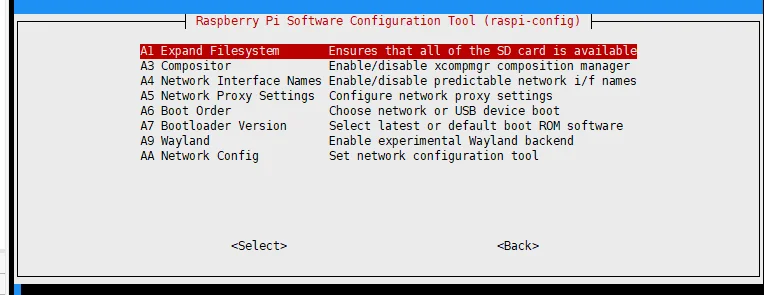
Set your Raspiberry Pi to network,Connect to the router and share the same LAN as your computer.
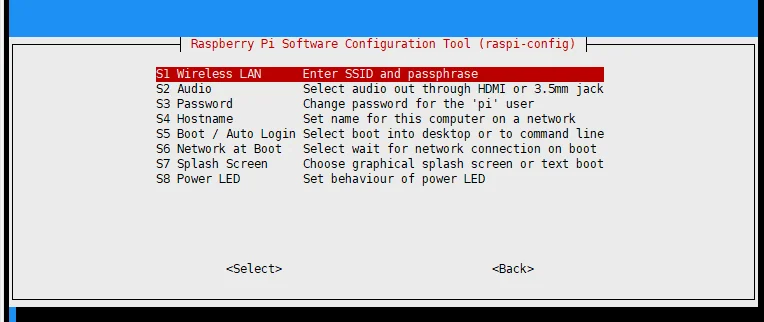
then reboot your Raspiberry Pi, you can connect PilotPi to QGC with UDP Now.
Note,Your raspberry pi must have wireless WiFi function, otherwise you will have to use Radio Telemetry to connect.
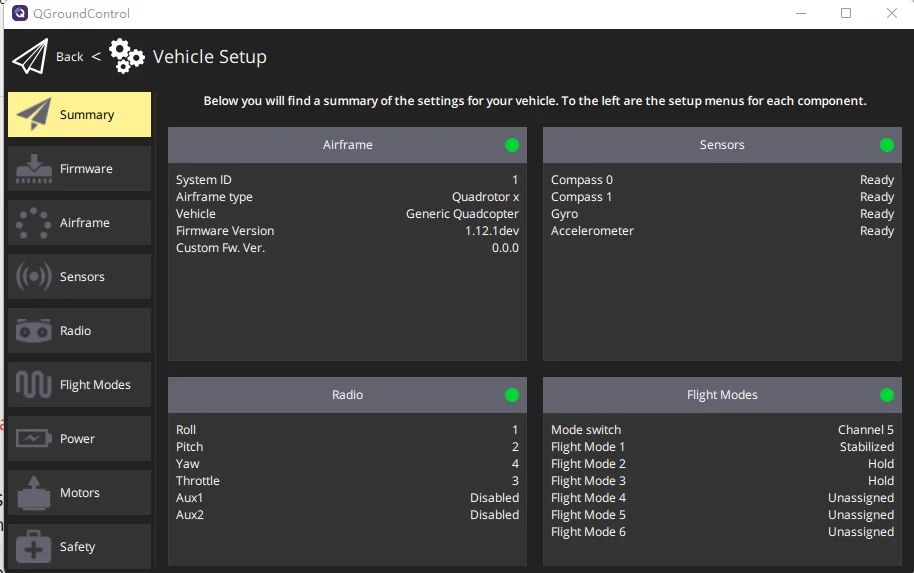
Done, Good Luck!
About Prime Living
Prime Living is a Canadian online store offering a carefully selected range of quality products for home, automotive, tools, outdoor living, electronics and more.
We are committed to fast order processing, secure packaging and reliable tracked shipping to provide an excellent shopping experience.
Shipping policy
We carefully handle each order to ensure your package arrives quickly and safely. Please note that factors such as weather, postal traffic, or carrier performance may occasionally cause delays beyond our control.
We provide free shipping and dispatch all orders within 2 business days of payment, often sooner. All shipments are sent via international express air shipping, with a tracking number provided so you can follow your order every step of the way.
. Please provide a physical address, as we do not ship to P.O. Boxes.
Returns
Your satisfaction is important to us. Hexlight offers a 14-day Free return policy: if you are not fully satisfied with your purchase, you may request either a full refund or an exchange. All return shipping costs are fully covered by us.
Condition
Brand New
Shipping
This item is shipped directly from our supplier in China with tracking.