
Product Description
PGT05 JTAG Burner Recorder Use for HMI LCD TFT Module Display Smar Sceen Touch Pannel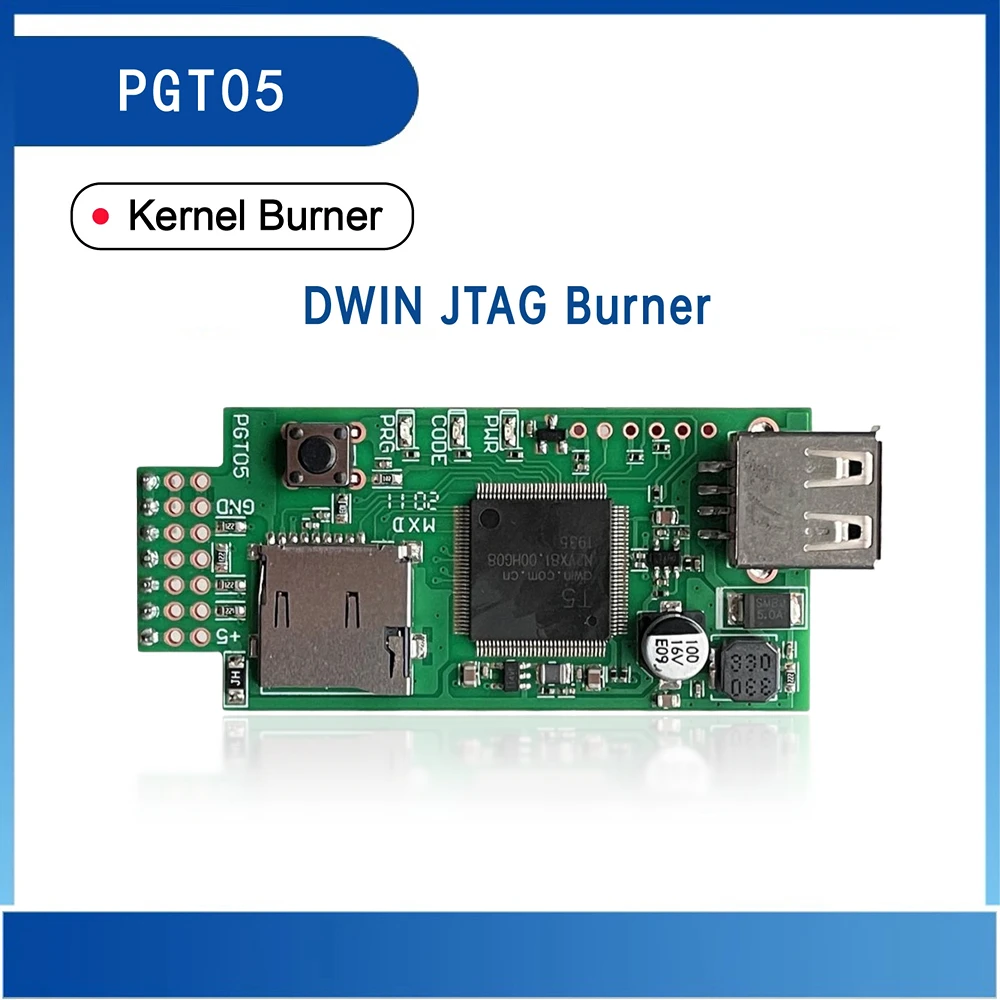 PGT05 JTAG Burner Recorder Use for HMI LCD TFT Module Display Smar Sceen Touch Pannel
Introduction
PGT05 is a kernel burner for burning kernel files. T5L burner and T5 burner use the same name.The difference is that T5 burner has 6 pins and T5L burner has 7 pins. Please confirm which model suitsyour demands.
Click to see T5L burner operation video:
Interface
Pin
Signal name
Type
Description
1
VCC
P
Power input
2
TMS
-
Mode selection
3
TCK
-
Clock
4
TDI
I
Input
5
TDO
O
Output
6
GND
P
GND
7
GND
P
GND
8
-
-
Burn start button
-
PRG
-
Burn success indicator
-
CODE
-
Burning status light
-
RWR
-
Power indicator
Reliability Test
Item
Conditions
Min
Typ
Max
Unit
Working
Temperature
60%RH at 12V voltage
-20
25
70
℃
Storage
Temperature
-
-30
25
85
℃
Working Humidity
25℃
10%
60%
90%
RH
Dimension
Dimension
132.09(W) × 59.94(H) ×26.11(T) mm
Net Weight
12g
Usage
Burn the kernel to PGT05 burner through SD card
①Name the kernel file T5UIC1V10.BIN, put it into the DWIN_SET folder in the SD card.
②Insert the SD card and supply 5V power to the PGT05 burner through the USB interface. The green indicators of PWR and CODE are always on. After about 3 seconds, the red indicator of PRG is alwayson.At this time, the kernel is burned to the burner.
Burn the kernel to the chip through PGT05 burner
①Remove the SD card and insert the PGT05 burner pin into the special burning hole of DWIN screen.T5l has 7 through-hole pads and T5 has 6 through-hole pads. (the pin "+ 5V" corresponds to the burning port"+ 5V" of DWIN screen, with square hole shape).
②Supply 5V power to PGT05 burner through USB interface, and the green indicators of PWR and code are always on.
③Press the button once, the CODE green indicator flashes for 3 times and is always on. About 3 seconds later, the PRG red indicator is on. At this time, the core is burned to the chip.
(it is recommended to disconnect the LCD power supply to avoid insufficient power supply; prevent the pin from connecting the metal plate behind the PCB board, resulting in short circuit)
Burning process: the second green light will flicker. After the flickering stops, the red light below will turn on, which means the burning is successful. If the red light is off, it means the burning is unsuccessful.
Connection diagram
Beijing DWIN technology Co.,Ltd. Whichis a high-tech enterprise that provides customers with high-quality human-machine interaction products and related system integration services.It has comprehensive strength to integrate IC, touch screen and LCD screen into the whole industry chain and manufacture it independently.
FAQ
Q1: How to start using the DWIN LCD module for development? Can I install it directly on my machine?
A: No, you must update the program to LCD first, and then mount it.
The first step is to check the software platform of the screen, which is explained in the datasheet.
The second step is to use the correct development SDK (different platforms use different SDKs) to complete the development.
The third step is to update and test the software program
The fourth step is to test ok and install it on the machine.
Q2: Does your product include program software?
A: Yes. Includes free graphical user interface software.
Q3: Do I need a minimum order quantity when purchasing DWIN products? At first I only needed some samples.
A: There is no minimum order quantity for standard products.
Q4: I don't know how to design the GUI or communicate with my device.where can i get help?
A:We provide a specific English manual and development guide for you.You can get nay kowledge required for developing.You can also check our YouTube channel for the instruction video,or directly contact with our sales to get some assistance.we can provide one-to-one technical support.
Q5: Will DWIN have online technical support?
A: Yes,of course, below ways you can get technical support.
- Whatsapp: +86 19192113166
- Customer service email: dwinhmi@dwin.com.cn
- DWIN Developer Forum:
International website:
- Development tool:
- Development guide:
- DGUS video tutorial:
- Leave messages to us on Aliexpress.
Q6: What size display can DWIN provide?
A: 1.28"-32".
Q7: I want to make some adjustments to your smart screen. Is it possible?
A: Yes, it can be customized. Design can include
1) Customize TFT-LCD module according to customer requirements;
2) Improve customized functions;
3) Extended flash memory 512MB;
4) Assign the interface to RS232, RS485 or TTL.
Q8: Do you use a resistive touch screen or a capacitive touch screen?
A:Can provide non-touch panel, resistive touch panel, capacitive touch panel.
About Prime Living
Prime Living is a Canadian online store offering a carefully selected range of quality products for home, automotive, tools, outdoor living, electronics and more.
We are committed to fast order processing, secure packaging and reliable tracked shipping to provide an excellent shopping experience.
Shipping policy
We carefully prepare and inspect every order to ensure it is securely packaged and shipped as quickly as possible. While we strive to deliver every package on time, occasional delays may occur due to factors beyond our control, such as weather conditions, customs clearance, or carrier operations.
We offer free shipping on all orders and dispatch them within 2 business days after payment, often sooner. All packages are shipped via tracked international express air shipping, allowing you to monitor your order every step of the way.
Estimated delivery time is generally between 10 and 20 business days, depending on your location and local carrier processing times. Our goal is to provide a fast, safe, and reliable delivery experience for every customer.
Returns
Your satisfaction is important to us. Prime-Living Canada offers a 14-day Free return policy: if you are not fully satisfied with your purchase, you may request either a full refund or an exchange. All return shipping costs are fully covered by us.
Condition
Brand New
Shipping
This item is shipped directly from our supplier in China with tracking.